Bid Leveling in Construction: Steps, Templates, Tools and More


Updated and reviewed in June 2026
Struggling to make sense of wildly different bids from subcontractors and vendors?
Sending out bid requests and waiting for responses to review is only half the job. No two subcontractors bid the same project the same way, making it challenging for builders to carefully assess each bid and select the one that best suits both their own and their client’s needs.
Bid leveling gives builders a cleaner way to review those proposals before awarding the work. It helps separate price from scope, catch missing items, clarify unclear assumptions, and compare each bid on equal terms.
To make your work easier, we have compiled a guide on bid leveling in construction, covering the necessary steps, practical tips, and tools to streamline your work with your partners.

Table of Contents
- What is Bid Leveling and Why Should You Do It?
- Bid Leveling vs Bid Tabulation vs Bid Comparison
- The Bid Leveling Process Explained (+ Practical Tips)
- What Should Be Included in a Bid Leveling Sheet?
- Common Mistakes to Avoid in Bid Leveling
- How to Spot a Risky Low Bid
- 3 Construction Bid Leveling Software Worth Checking
- Final Thoughts
What is Bid Leveling and Why Should You Do It?
At the end of the day, your goal is to opt for additional construction services at the lowest price yet, including only those that meet your quality standards. Bid leveling, also known as bid comparison or bid evaluation, helps you do just that.
Bid leveling in construction is the process of reviewing and comparing bids from different subcontractor and vendors to find the most cost-effective and qualified option for the job.
Sometimes, it can be very easy to choose a bid if you know exactly what you are looking for and what to expect. The decision-making process tends to be more straightforward with clearly defined project objectives, desired outcomes, and quality criteria. However, there are times when the bid selection turns into a challenge. Choosing one with the lowest price can be risky, or even worse, it can result in even higher costs.
The reason for this lies in inadequate bid leveling and choosing to work with a vendor who isn’t ready to provide the complete services or the right quality. By conducting a thorough bid leveling process, you can ensure that all bids are evaluated in an unbiased and standardized manner, ensuring a fair comparison.
Bid Leveling vs Bid Tabulation vs Bid Comparison
Bid leveling, bid tabulation, and bid comparison are closely related, but they are not the same thing. Each one helps construction teams review subcontractor or vendor proposals, but they serve different purposes in the bidding process.
Bid tabulation is usually the first step. It organizes submitted bids in one place so the team can see who bid, what amount they submitted, and which scope package the bid relates to. A bid tab is useful for getting a quick view of pricing, but it does not always show whether each bidder included the same work.
Bid comparison goes a step further. It reviews the differences between proposals, including pricing, inclusions, exclusions, alternates, and basic qualifications. This helps builders understand why one bid may be higher or lower than another.
Bid leveling is the most detailed of the three. It adjusts and reviews bids against the same scope of work so every proposal can be compared fairly. Instead of looking only at the submitted price, bid leveling checks whether each bidder included the same materials, labor, equipment, schedule assumptions, permits, cleanup, warranties, and other project requirements.
For example, one subcontractor may submit a lower number but exclude disposal, equipment rental, or a required addendum. Another may appear more expensive but include the full scope. Without leveling the bids, the cheaper option may look better on paper while creating extra costs later.
In simple terms:
- Bid tabulation shows the submitted numbers.
- Bid comparison highlights the differences between proposals.
- Bid leveling helps determine the true cost of each bid after scope gaps and assumptions are reviewed.
For builders and general contractors, bid leveling is the step that protects the decision. It helps avoid awarding work based only on the lowest price and gives the team a clearer view of which bid is complete, accurate, and best aligned with the project scope.
The Bid Leveling Process Explained (+ Practical Tips)
At a basic level, bid leveling could be done in a spreadsheet. Each bidder gets a column, and each scope item, quantity, unit price, allowance, exclusion, or qualification gets its own row. The goal is not only to compare totals. It is to compare the bids on equal terms.
Yet, construction project management software gives teams a cleaner way to manage the same process. Bid requests, proposals, clarifications, scope notes, exclusions, etc. This makes it easier to track what changed and compare bids on equal terms. You can also add the approved bids to your estimate, thus having the final numbers organized in one place.
This process is very close to bid tabulation when you compile the essential information received from each subcontractor and vendor and put it into a table to compare everything in one place.
But a lower number does not always mean a better bid. One subcontractor may include prep work, disposal, material handling, and mobilization, while another may leave those items out or bury them in notes. Bid leveling brings those differences into view before the contract is awarded.
Step 1. Start With a Clear Bid Request
The first step in any construction project is to provide clear descriptions and instructions for the work that needs to be done. If the bid request is vague, the comparison will be messy no matter how good the template is.
A clear bid request should define:
- The exact scope of work
- Relevant drawings, specifications, and plan references
- Required quantities or takeoff information
- Alternates, allowances, and unit-price items
- Submission deadline and required proposal format
- Insurance, bonding, schedule, and site requirements
- Any exclusions that are not acceptable
For example, if the package is for paving and surfacing, the request should separate major cost items such as demolition, grading, base preparation, asphalt paving, striping, drainage adjustments, and cleanup. This makes it easier to see whether every bidder priced the same work.
The stronger the bid request, the fewer assumptions subcontractors have to make. That usually leads to cleaner proposals and fewer pricing gaps during comparison.
Step 2. Organize All Bids Into One Comparison Format
Once the bids are received, the next step is to pull them into one consistent format. This is where bid leveling begins to look like bid tabulation, but the purpose goes deeper than listing prices.
A practical bid leveling table should include:
- Bidder name
- Base bid amount
- Scope items included
- Scope items excluded
- Unit prices
- Alternates
- Allowances
- Qualifications or assumptions
- Schedule availability
- Payment terms
- Warranty or service terms
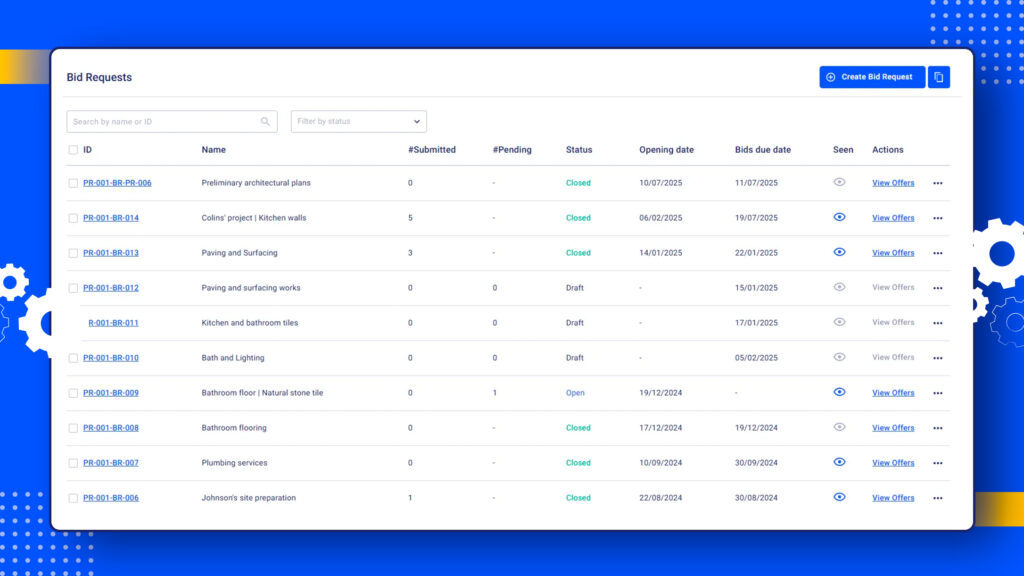
Of course, you can do this manually, but if you want to avoid the hassle and potential for errors, you can have a look at Buildern’s bid comparison functionality.
The software will highlight the most beneficial price offers for each cost line, making it easier to identify the best options. You can choose any offer and transform it into a purchase order or bill with a few simple clicks. When everything is kept and managed through a single platform, you can guarantee that no information gets lost or forgotten, and the entire process becomes streamlined.
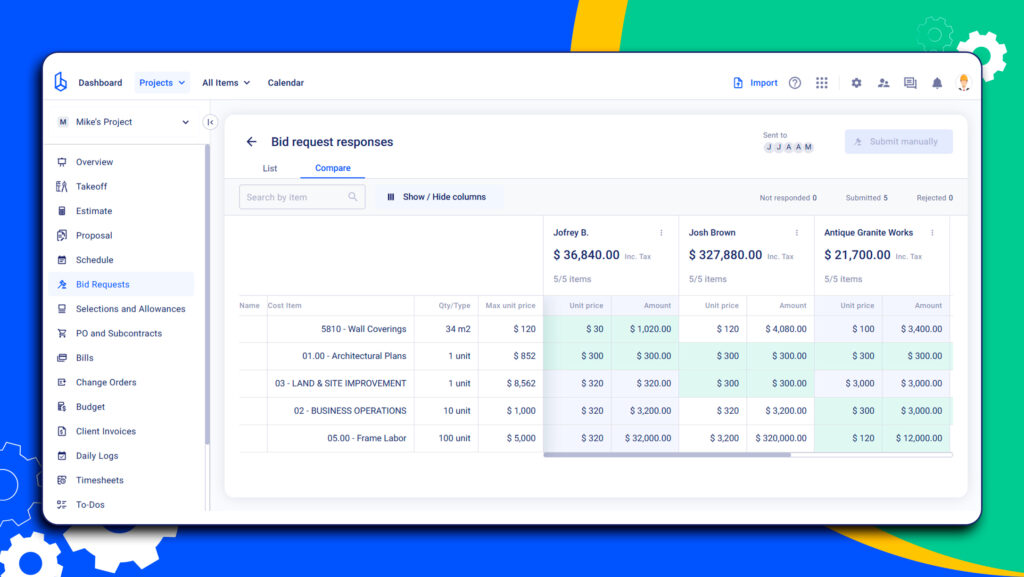
The key is consistency. If one bidder prices asphalt paving by square foot and another prices it as a lump sum, the numbers need to be normalized before they are compared. Otherwise, the table may look organized while still hiding major differences.
Step 3. Check Scope Coverage Before Comparing the Prices
This is the step many teams rush, and it is usually where mistakes happen.
Before deciding who is cheaper, confirm who actually covered the required scope. Look for missing items, unclear inclusions, vague exclusions, and language that shifts responsibility back to the builder.
Common red flags include:
- “By others” notes attached to important work
- Missing mobilization, cleanup, or disposal costs
- Exclusions for layout, permits, testing, or inspections
- Material substitutions that do not match the specification
- Pricing that does not align with the requested quantities
- Proposal notes that conflict with the drawings or the scope sheet
A bid that excludes required work should be adjusted before comparison. Otherwise, the builder may award the job based on a number that will grow later through change orders.
Step 4. Normalize the Numbers
After scope gaps are identified, each bid should be adjusted so the comparison reflects the same work. This does not mean changing the subcontractor’s proposal. It means creating a leveled view for internal decision-making.
For example:
- If Bidder A excludes cleanup and Bidder B includes it, add an estimated cleanup value to Bidder A’s comparison column.
- If Bidder C includes a higher-quality material, note the difference and decide whether that premium is required.
- If one bid includes an alternate, separate it from the base bid so it does not distort the total.
This step helps the team compare real cost exposure, not just proposal totals.
Step 5. Review Qualifications, Schedule, and Risk
Price is only one part of the decision. A bid can look strong on paper and still create problems if the subcontractor cannot meet the schedule, has unclear qualifications, or carries too much risk in the fine print.
Before selecting a vendor, review:
- Can they meet the project schedule?
- Are their exclusions acceptable?
- Do their qualifications create extra risk?
- Are their labor, equipment, and material assumptions realistic?
- Have they priced the current drawings and specifications?
- Do they have the required insurance, licensing, and bonding?
Step 6. Clarify Gaps Before Awarding the Work
Once the comparison is complete, the builder should go back to the bidders with specific clarification questions. Broad questions like “Can you confirm your price?” are usually not enough.
Better questions sound like this:
- “Does your price include removal and disposal of existing asphalt?”
- “Please confirm whether striping is included in your base bid.”
- “Your proposal excludes testing. Can you price that as an add alternate?”
- “Please confirm your unit price for additional base repair.”
- “Can you meet the required start date of May 12?”
These clarifications should be documented and attached to the final bid record. If the bidder revises their proposal, the updated version should replace the old one in the comparison.
What Should Be Included in a Bid Leveling Sheet?
A bid leveling sheet should make it easy to compare subcontractor and vendor bids on the same basis. The goal is not just to list prices, but to understand what each bidder included, what they left out, and what the final cost may look like after all adjustments are made.
A strong bid leveling sheet should include:
- Bidder name and contact details: Record who submitted the bid, their company name, contact person, phone number, and email so follow-ups are easy to manage.
- Base bid amount: Include the original submitted price before any adjustments, exclusions, alternates, or scope clarifications are applied.
- Scope items included: List the specific labor, materials, equipment, services, and deliverables covered in the bid. This helps confirm whether the bidder priced the full requested scope.
- Scope exclusions: Note anything the bidder did not include, such as permits, cleanup, disposal, freight, equipment rental, temporary protection, or specific materials.
- Allowances: Record any allowance amounts included in the bid, especially for materials, fixtures, finishes, or other items where final costs may change.
- Unit prices: Include unit rates for work that may increase or decrease, such as excavation, concrete, flooring, drywall, or other quantity-based items.
- Schedule assumptions: Note the bidder’s expected start date, duration, lead times, manpower assumptions, and any limitations that could affect the project schedule.
- Payment terms: Include deposit requirements, billing frequency, retainage, milestone payments, or any unusual payment conditions.
- Warranty terms: Record warranty coverage, warranty duration, and any limitations that may affect long-term project value.
- Insurance and bonding requirements: Confirm whether the bidder meets the required insurance, licensing, bonding, and compliance standards for the project.
- Clarification notes: Track questions, responses, revised pricing, and any follow-up items discussed during the leveling process.
- Final adjusted bid amount: After reviewing exclusions, allowances, alternates, and missing scope items, calculate the adjusted number that reflects the true comparable cost.
For builders, the best bid leveling sheet is one that keeps pricing, scope, exclusions, and clarifications in one place. Spreadsheets can work for smaller projects, but they often become difficult to manage when multiple trades, revisions, and approvals are involved.
With Buildern, teams can keep bid information connected to estimates, compare offers more clearly, and reduce the back-and-forth that usually happens across emails, PDFs, and separate files.
Common Mistakes to Avoid in Bid Leveling
Communication can make or break your construction projects, which is also true for bid leveling. As such, it’s crucial to avoid any possible mistakes that may hinder communication and lead to errors in the bidding process.
Consider paying more attention to things like:
#1 Comparing Significantly Different Offers Without Clarifying the Gap
While reviewing and comparing bids, you may notice significant differences between two or more offers, indicating an error or misunderstanding by one of the bidders.
In such cases, you can again go through the task requirements and resend the bid request. Buildern allows you to resend bid requests only to selected vendors, making it easier to fix any discrepancies.
#2 Accepting Incomplete or Incorrect Bids
This can cause delays and confusion during the bid leveling process. Therefore, it’s essential to double-check all bids for accuracy and completeness before finalizing them.
If you send bid requests via Buildern, your partners cannot submit their offers without completing all required fields, ensuring that each proposal is detailed and precise. This will prevent the submission of incomplete data and ensure that your bid leveling runs smoothly.
#3 Bid Leveling With Total Price Before Reviewing Scope
This is probably the most expensive mistake in bid leveling. A total price can look attractive while hiding missing work, weak assumptions, or exclusions that later turn into change orders.
The better approach is to compare the scope first, then price. Confirm what each bidder included, what they excluded, how they treated allowances and alternates, and whether their proposal matches the current drawings and specifications. Only then does the total number mean anything useful.
How to Spot a Risky Low Bid
A low bid is not always a bad bid. Some subcontractors may have better pricing, stronger supplier relationships, or a more efficient way to complete the work. But when one bid is significantly lower than the rest, it deserves a closer review before the contract is awarded.
In many cases, a risky low bid is not cheap because the bidder found savings. It is cheap because something is missing, misunderstood, or pushed into future change orders. Therefore, we suggest having a bid leveling checklist at hand to spot some common red flags:
- The bid is much lower than the others: If one proposal is far below the average, confirm whether the bidder understood the full scope.
- Important scope items are missing: Check whether labor, materials, equipment, supervision, cleanup, disposal, freight, permits, or temporary protection were excluded.
- The proposal has too many exclusions: A long list of exclusions can make the bid look cheaper upfront while shifting costs back to the builder later.
- The scope language is vague: Phrases like “as needed,” “standard work,” or “by others” should be clarified before award.
- Unit prices are missing or unclear: Without unit prices, it becomes harder to manage quantity changes during the project.
- Insurance, licensing, or bonding details are incomplete: A cheaper bid is not worth the risk if the subcontractor does not meet basic project requirements.
- The schedule looks unrealistic: A low bid may not help if the subcontractor cannot meet the required start date, manpower needs, or project duration.
A risky low bid can quickly turn into a more expensive choice once missing scope, delays, and change orders are added. The goal of bid leveling is not to avoid low bids altogether, but to confirm whether the low number is complete, realistic, and safe to award.
3 Construction Bid Leveling Software Worth Checking
According to surveys and general observations, some builders prefer implementing bid leveling manually. As a rule, they print out all their bids for each project, review, and write down notes for each offer to compare them later. When the bids are analyzed, they create a new document with the final results.
However, manual bid leveling can be time-consuming and prone to unexpected errors. That’s why we encourage you to play on the side of builders using construction project management software with advanced functionality for your work.
Let’s further review some options available on the market.
Buildern
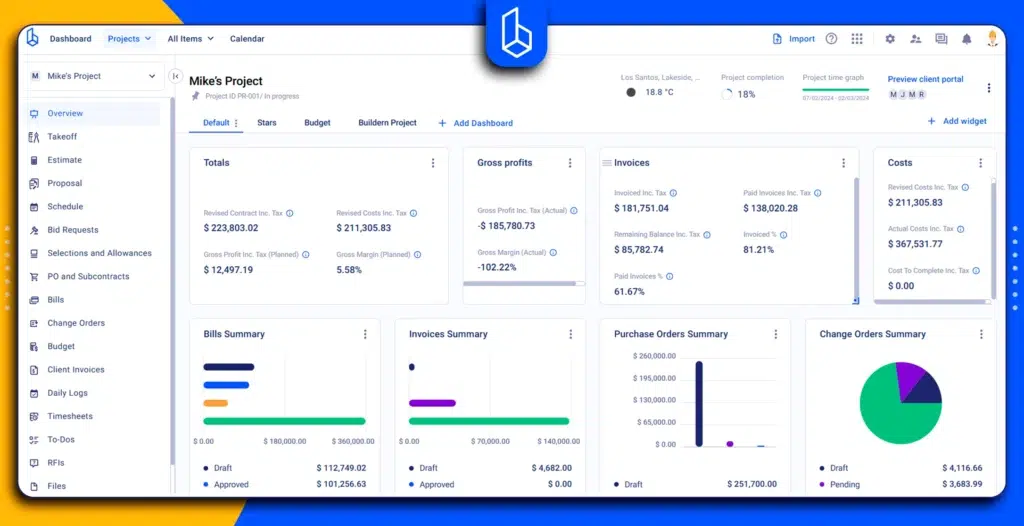
Buildern is a multifunctional construction project management and estimating software designed for every work stage. Its bidding module allows users to create bid requests and send them to subcontractors and vendors with just a few clicks.
Moreover, you shouldn’t necessarily add your subcontractors to your account (although this won’t add up to your pricing plan). Instead, you can freely communicate with them through user-friendly web forms that are sent out to them via email.
You can easily send out bid requests, receive offers from subcontractors/vendors, compare bids side-by-side, and even create purchase orders or subcontracts with them for further workflow.
There might be times when your subcontractors cannot submit their offers online and send you their bids through email or other means. In such cases, the manual bid entry feature allows you to easily add them to your system and compare their bids with others.
Cubit Select for Tender Management
Designed specifically to improve bid management processes, Cubit Select is a tool that helps builders compare and select offers from vendors. It can be an efficient solution if all your construction workflows are well-developed and you only need a separate tool to manage bids. It can also integrate with Cubit Estimating software to make other tasks easier to manage.
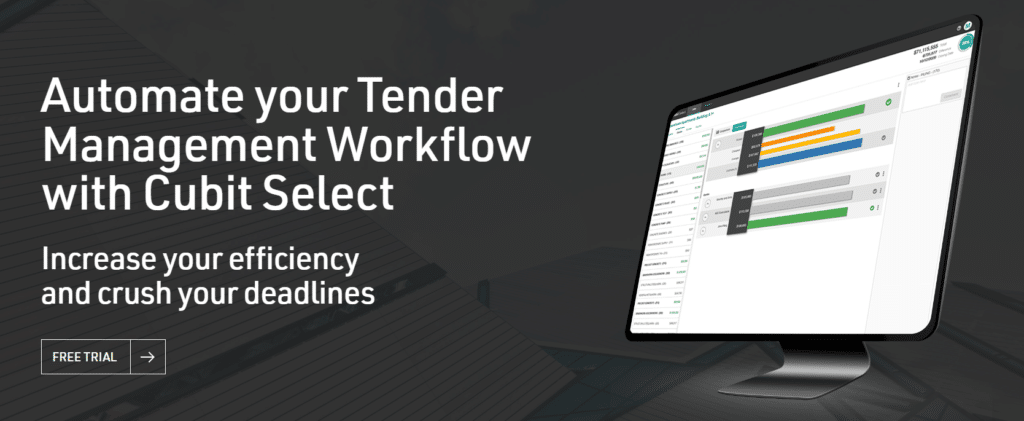
However, if you need an even more advanced toolset to manage all your construction tasks, Cubit Select may offer limited features. In this case, look for software that not only focuses on bid management but also has features for scheduling, invoicing, document management, etc.
Downtobid Bidding Software
Downtobid offers a smarter approach to construction bidding. With its AI capabilities and the ability to work with a real-time contractor database, the software helps builders connect only with verified trade partners.
The software’s Planroom functionality creates a space for subcontractors to work with all the project-related plans and specs. This is especially useful for projects involving a ton of paperwork and tasks requiring constant work with different versions of the same document.
Downtobid can be useful for bid leveling, but just like with the previous software, this one doesn’t offer extended functionality for other construction project management tasks. You will need more advanced solutions to connect bids with the estimate, bills, and purchase orders, and keep all processes in a single place.
Final Thoughts on Bid Leveling in Construction
We now know that bid leveling is a crucial practice for any construction project to stay true to the budget and avoid potential disputes with subcontractors and vendors. However, it’s not a one-size-fits-all solution and may require additional automation to provide access to real-time data, save time, and reduce errors in the bidding process.
Carefully evaluate your needs and consider integrated solutions to foster professional and equal work conditions through all partners.